
Perspire vs. Everfit
The Best Everfit Alternative for Trainers Who Teach Groups, Not Just Individuals
A comparison of Perspire and Everfit for coaches who teach group classes instead of writing 1:1 programs.
Why switch
Why fitness creators switch to Perspire
Here's why independent trainers, coaches and fitness creators choose Perspire.tv to grow an audience and earn from their content.
The comparison
Perspire vs. Everfit
What is Everfit?
Everfit is online coaching software built around one-to-one workout programming. It gives you a drag-and-drop workout builder, a large library of exercise demonstration videos, and support for supersets, intervals, AMRAP, EMOM and %1RM auto-progression, plus habit and progress tracking. Clients you already have download the Everfit app to follow the plans you write for them.
What is Perspire?
An online fitness platform that combines live streaming and on-demand video in one place. Think of it as a creator marketplace built for fitness. You set up your own channel, go live or upload workouts, and price your content in Coins. New users discover you through Explore, category pages and search, and every Coin they spend supports you. Perspire is free to join and takes a flat 20%, so you keep 80% of what you earn.
| At a glance | Perspire | Everfit |
|---|---|---|
| Built for | Fitness creators building an audience | Coaches programming for 1:1 clients |
| Teaching model | One-to-many, live and recorded | One-to-one, written programs |
| Built-in audience | Yes, a public marketplace | No, you bring your own clients |
| Live classes | Built in, with live chat | Not a native feature |
| On-demand video | Sell to the public at your own price | Exercise demos inside a client's program |
| Cost of growth | None, the split never changes | Climbs as you add clients, on a per-client slider |
Discovery
Get discovered: a built-in audience, not just client management
This is the biggest difference. Everfit is very good at what it does, but it is back-office software: it starts working only once someone has already agreed to be your client. There is no browse page, no public profile that strangers land on, no way for a person looking for a strength coach to find your programming. Every client has to come from your own marketing. Perspire works the other way. It is a public, browsable marketplace where new users find you. Here is where you show up:
- Explore feed: your live sessions and videos appear where users browse for workouts.
- Categories: you're grouped under the styles you teach, like yoga workouts, HIIT sessions and strength training, putting you in front of people already browsing that style.
- Popular Instructors and trending: active trainers get featured to fresh audiences.
- In-app search: users searching inside Perspire can find your channel and your classes.
Niche styles get found just as easily. Dance classes, barre workouts, pilates classes, core training, cardio workouts and boxing workouts each get their own category page, right in front of the users already looking for that style.
Pricing
You do not pay until you earn
- No cost to start: free to join, no monthly fee, no credit card required.
- You keep 80%: Perspire takes a flat 20% of Coins spent on your content, across every type of sale.
- Coins, in plain numbers: Coins start at $10 for 100, about 10 cents each. A 50-Coin class is about $5 of user spend, roughly $4 of that yours.
- Paid out through Stripe: your earnings convert to USD and transfer to your connected bank account.
| Feature | Perspire | Everfit |
|---|---|---|
| Cost to join | Free to join, no card | Free for up to 5 clients, then paid |
| Cost at scale | Unchanged, always 20% of sales | Around $95/month at 50 clients, around $290/month at 300 |
| Add-ons | Included: live, video, channel, subscriptions | Meal plans, automation and payments are paid modules on top |
| Public video sales | Yes, set your own price per video | Videos serve individual client programs |
| Channel subscriptions | Yes, recurring access to all your content | Recurring client billing, not content subscriptions |
Live streaming
Go live, then sell the replay
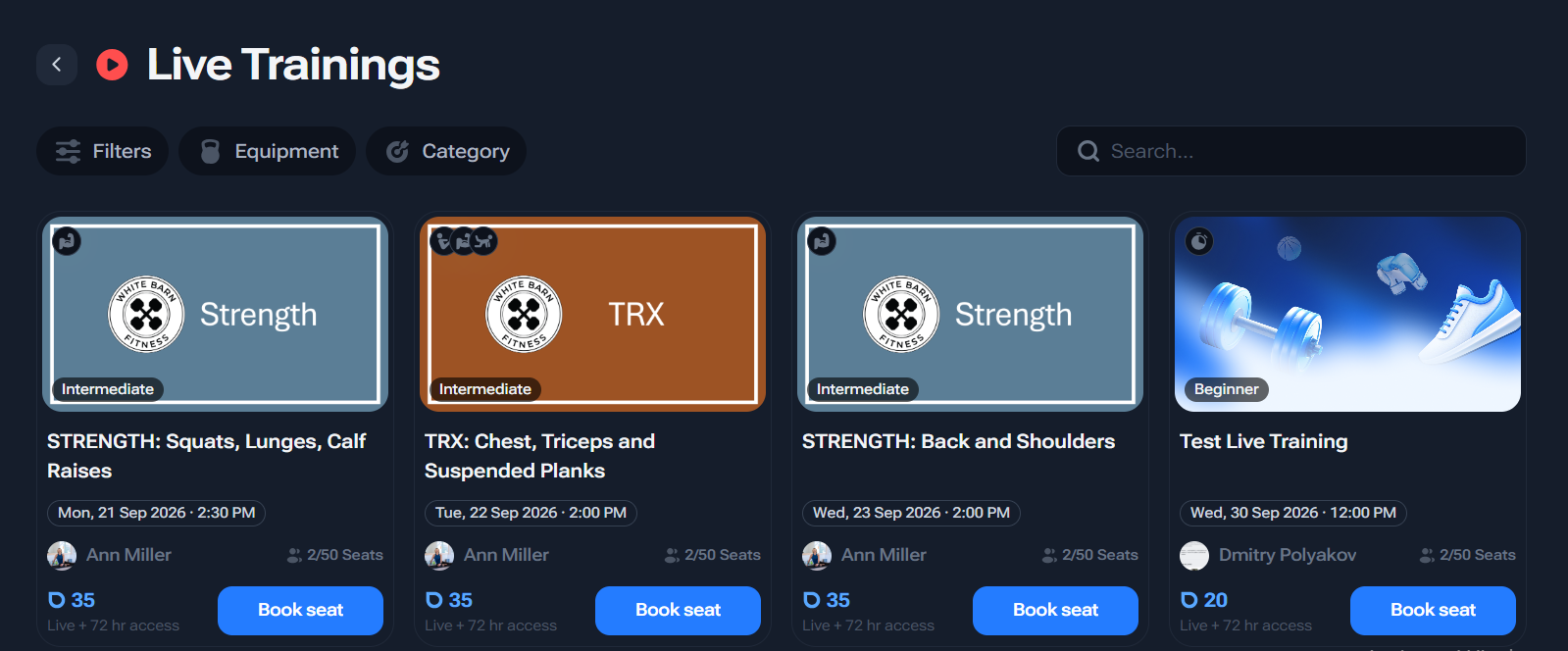
Live streaming is Perspire's most developed feature, and it is the thing a 1:1 coaching app does not attempt. You run the whole thing from your trainer Dashboard, and one class can earn money more than once:
- Schedule from your Dashboard: set date, time and length, pick a fitness level, tag equipment.
- Go live early: start up to 15 minutes before the scheduled time, choose your mic and camera at launch.
- Real-time chat: see your attendees and chat with them during the session.
- Two prices, one class: a Live Training Price for booking a seat, and a Recording Price for renting the replay.
- The replay keeps selling: every recording saves automatically, and renters get 72 hours of access.
Revenue streams
Four ways to earn from one channel
Everfit has one revenue shape: you coach a client. Perspire lets you stack several income streams from the same work, and you set every price yourself:
- Live seat bookings: real-time paid classes.
- Recording rentals: the 72-hour replay of each live session.
- On-demand videos: standalone workouts you upload and price one by one.
- Channel subscriptions: recurring access to all your content, for steady income.
You can also sell Fitness Programs: structured multi-day plans and challenges bundled into one package. Together, this gives you a full creator funnel. Free content attracts followers, paid one-offs convert them, and subscriptions keep them coming back. The practical difference is leverage. On a per-client platform, doubling your income means doubling your hours and paying for more client slots. On Perspire, the same live class can be sold to fifty people at once and keep selling as a replay afterwards.
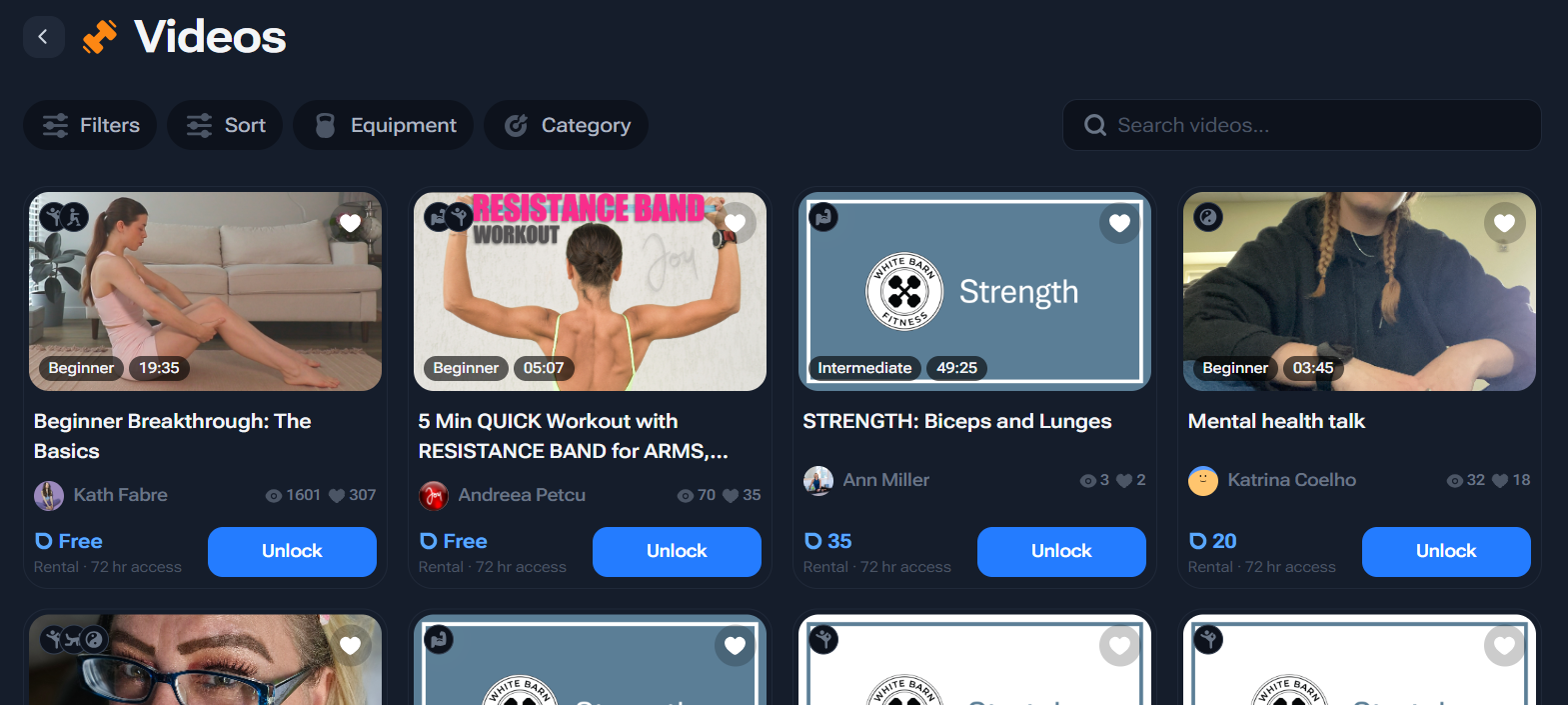
On-demand video
Build a video library that sells while you sleep
- Upload and price: mark each pre-recorded workout free or paid in Coins.
- Organize into Collections: group videos into series or playlists.
- Control every detail: set title, description, thumbnail, fitness level and equipment tags.
- Earn passively: your library keeps selling in the background while you focus on new content.
Your brand
Your channel is your storefront
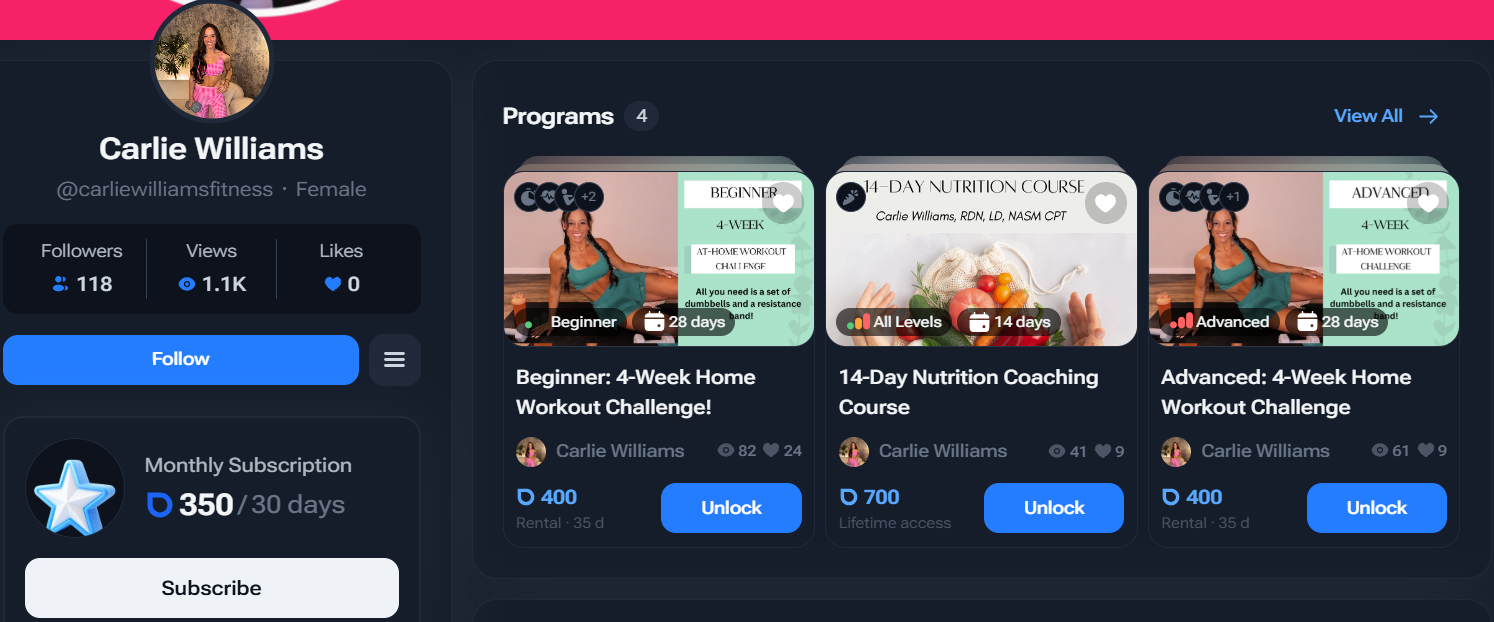
On Perspire, your account is a public channel that doubles as your marketing page. It gives an independent trainer a credible, branded home without building a website:
- Your public profile: set a username, write an About Me bio, add a profile picture and social links.
- Build trust: add your certifications or licenses so users can see your background.
- Get matched to the right users: set your specialties, so different coaches reach different audiences.
- One home for everything: your videos, live sessions and subscription offers all live on one page.
- Share in one click: copy a direct link to any session and post it anywhere.
Getting started
How exactly does Perspire work for trainers?
Getting started on Perspire takes minutes, and there is nothing to pay up front. Here is the whole flow:
- Sign up free: create your trainer channel in minutes, no monthly fee, no credit card.
- Set up your channel: add your bio, profile picture, certifications and specialties.
- Connect Stripe: link your account once so earnings can pay out to your bank.
- Create your content: go live or upload pre-recorded workouts, group videos into Collections.
- Set your prices in Coins: price live seats, recordings, videos, subscriptions and programs.
- Get discovered and earn: new users find you through Explore and search, and you keep 80% of every Coin spent.
Start building your Perspire channel for free
No monthly fee. No credit card. Keep 80% of everything you earn.
Get Started for FreeFAQ
What you might be wondering
Is Perspire free for trainers?
Does Perspire charge by the client the way Everfit does?
Are there add-ons I have to pay for on top?
Does Perspire have live streaming?
Can I sell recordings of my live classes?
How do trainers get paid on Perspire?
How is Perspire different from Everfit?
Can I use both?
Full feature set
Everything Perspire gives fitness creators
Built-in marketplace
Show up in Explore, category pages and Popular Instructors so new users find you.
Live streaming
Go live with real-time chat. Start up to 15 minutes early and pick your mic and camera.
Dual-price live and replay
Charge for live seats, then sell the saved recording at its own price.
On-demand video
Upload workouts, set them free or paid, and group them into Collections.
Channel subscriptions
Offer unlimited access to your content for steady, recurring income.
Programs
Bundle multi-day plans and challenges into one package you can sell.
80/20 revenue split
Keep 80% of every Coin spent on your content. No monthly fee to join.
Stripe payouts
Earnings convert to USD and pay out to your bank through Stripe.
Multi-device access
You and your audience can use Perspire on phone, tablet and computer.
Branded channel
A public profile with your bio, certifications, specialties and social links.